How events work
An event is a time, a place and a door list: a night at your place, a group thing, a play party. Vetted members post them and come to them. Pending and Anonymous accounts don't see events at all.
Posting one
Long-press the map where it is and pick Start an event, or, while you're hosting, open your status and pick Make it an event. Give it a title, a start and an end (a day at most, up to two weeks ahead), how many people it has room for, a description, your rules and a few tags. The description takes up to 5,000 characters, with headings, bold, italic and lists; Preview shows it as people will see it.
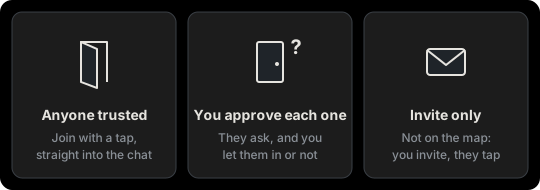
Then pick who gets in:
- Anyone trusted. Any vetted member can join with a tap and goes straight into the event chat.
- You approve each one. People ask. You see each one's photo, handle, distance, position, age and headline, and let them in or not.
- Invite only. It isn't on the map. You invite people you've talked to, from the event's page, and they join with a tap.
You can invite people you've talked to whatever you picked.
You can add a photo too. It has to be safe for work, and it shouldn't show your place: no door, no street, no view a neighbor would know, since people can work out an address from a photo. You choose whether everyone who sees the event sees it, or only whoever's in. A group's event without a photo shows the group's cover.
Where it shows
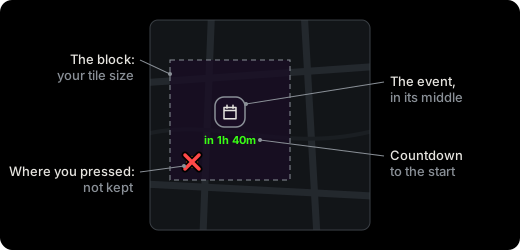
The map never shows your address. The event sits on a blurred block around where you pressed, the same size as your own pin's (your tile size), and the point you pressed isn't kept. It shows a countdown to the start and comes off the map when it ends.
The event chat
Everyone who's in is in the event's chat, with you. That's where you give the address, when you're ready. Everyone in the chat sees what's sent there, photos included, and photos stay in the chat. It closes a day after the event ends.
In your calendar
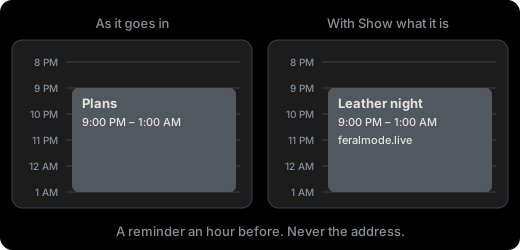
The calendar button on an event's page adds it to Apple, Outlook or Google Calendar, with a reminder an hour before. Calendars sync to your other devices and to anyone you share yours with, so it goes in as "Plans" and the time, nothing else, unless you turn on Show what it is. Your calendar never gets the address.
Saying no
A no is silent. Someone you turn down isn't told; their page still says they asked. You can take someone off the list once they're in, and they leave the chat.
If something's wrong
Every event has Report this event in its menu. A report is about the host. Blocking someone works here too: you won't see their events, they won't see yours, and in an event chat you won't see each other's messages.
Updated October 24, 2026