Meet: from yes to face to face
The worst part of apps like this isn't the people who say no. It's the ones who say yes and vanish. You clean up, you wait by the door, you drive across town, and nobody's there.
Meet fixes that. It turns "come over?" into a plan both of you can see, follows it from yes to face to face, and keeps a record of who actually shows up. Saying no never counts against anyone. Going quiet on someone does.
Why it's worth it
When you're hosting
- No more waiting by the door for nobody. You see the moment they set off, their dot on the map and their arrival time. If they stop updating, you see how long ago they did.
- Your address isn't handed out on a yes. They get it only when they tap On my way. Walking away after that is a no-show on their record, so "send me your address" stops being free.
- You know who you're letting in. Their Shows up line is on the plan before you answer: "Shows up · 9 of their last 10", or a warning if they've been missing meets.
- The door notes wait. Unit, buzzer, which door: they see it when they get there, not before.
When you're going to them
- You know the place is real. The place comes from their phone, not from an address they typed. You see whether their phone is actually there: "Their phone is here", "was here 40 min ago", or "isn't here". If it isn't, the address stays hidden and you're told before you set off.
- You know they're expecting you. Your arrival time is on their screen, so nobody's caught off guard.
- Directions open in your own maps app, the one you already trust.
- Someone knows where you are. Tell a friend sends one person a private link with the time, the handle and the place. Keep them posted as often as you like, and send a last check-in when you're done.
For everyone here
- People who show up stand out. Every member's card carries their Shows up line, so the reliable ones are easy to find.
- People who ghost run out of road. 3 no-shows in 30 days pause Meet for them for 14 days, and anyone they ask sees a warning before that.
- Nobody's pushed into anything. No, not now, I changed my mind, I don't feel safe: none of it ever counts. The only thing that counts against you is leaving someone hanging.
How it keeps us honest
Your record counts showing up, not saying yes
Your Shows up line counts two things: meets that happened, and meets where you went quiet. Everything else is neutral.
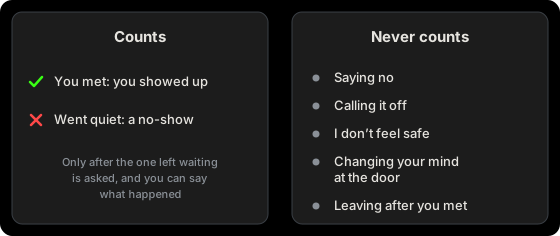
Nothing is recorded behind your back. A no-show is written down only after the person left waiting is asked "Did they show?" and says they didn't. If it's recorded against you, you're told, and you can say what happened for 72 hours. A moderator looks at the plan's times and decides. While they look, it doesn't count.
A moderator never sees where either of you was, because nobody has that, us included.
Where you are stays between the two of you
The place, your position on the way and the host's phone checking in are locked on your phone and opened on theirs. Only those two phones hold the key. Our server passes the locked version along and throws it away when the meet ends. It never sees where anyone is, and neither does any moderator.
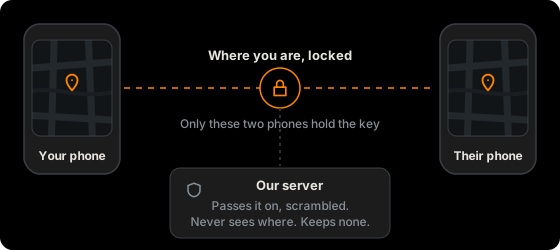
What we do see: that two members have a plan, and when each step happened. That's what lets the record and a dispute work.
Honest limits: the app comes from us, so this protects you from leaks, from anyone who gets into our servers, and from requests for records. We can't promise it protects you from us. A web app also can't tell for certain when a phone fakes its location, so the host's phone notes anything that looks off, and a moderator sees those notes if something's reported.
If someone sends you to the wrong place
If you got to the place and their phone wasn't there, Did they show? lets you say "This wasn't their place". It counts as their no-show and goes to a moderator as a safety report. When that happens to someone twice, from two different members, their account is put on hold and whoever vouched for them is asked to answer for it.
If they're not who their photos say
After you meet, you're asked privately: is this the person in their photos? Yes, Not really, or Skip. They never see your answer. When two different members say Not really, a moderator looks at their photos. It's yes or no on purpose: it's about catfishing, never about anyone's body.
Step by step
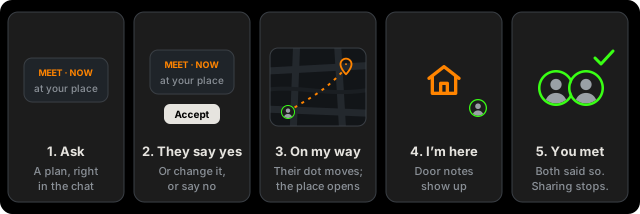
1. Ask
In a one-to-one chat with another vetted member, tap + and pick Meet. Choose:
- When: Now, or a time in the next 24 hours.
- Where: I'm hosting, I'll come to you, or At a spot.
Hosting takes your place from your phone. You can drag the pin up to 50 m onto your door, but you can't type an address or move it across town. Add door notes if you like: they're shown only when your guest arrives.
2. They answer
They see a card in the chat with your Shows up line, and Accept, Change or Decline. Change sends the plan back with a new time or place for you to answer. A Now plan nobody answers lapses after 10 minutes. Declining is free.
For a plan later on, both of you get Still on? 20 minutes before.
3. On my way
When you leave, tap On my way and say how you're getting there. That's the commitment. The place opens to you, your arrival time goes to them, and they can see your dot until you get there.
Directions opens your phone's own maps. Your position updates while the app is open; if you switch to your maps, they see your last update and an estimate. Keep screen on helps. You can stop sharing any time without calling anything off.
4. I'm here
Tap I'm here at the door. They get "you're outside", and you get the door notes. Then both of you see Together? One tap from either of you is enough when the phones can tell you're close. If they can't, Use a code: one phone shows three digits, the other types them.
5. Afterwards
Sharing stops the moment you've met. You get the private photo question. With Plus, you're asked if you want to update your notes on them.
Your meet sits on the Happening now bar above the tabs from the moment it's planned, on every screen, chats included. After you meet it stays there until you tap End it on it, so Your friend is still a tap away while you're together. If your friend is still waiting on you, ending it sends your last check-in. Left alone, it goes after a day.
Changing your mind
Call it off works at every step, with a line to say why if you want. Before anyone sets off it means nothing at all. After someone's on the way, it still doesn't count against you, though calling off late again and again shows as "Often calls off late".
I don't feel safe is at the bottom of the Call it off sheet, at any point, the door included. It ends the plan at once. They see only "Called off", it never counts, and you can report or block them from there.
Changing your mind after you've met is your business. It never touches anyone's record.
If they don't show
If they haven't set off 15 minutes after the time, or aren't there 30 minutes after their estimate, you're asked Did they show?:
- They showed: it counts as met, for both of you.
- We sorted it out: nothing is recorded.
- They didn't: a no-show on their record.
- This wasn't their place: when you got there and their phone wasn't, as above.
If nobody answers, nothing is recorded.
Meeting at a spot
Pick At a spot and choose one nearby or search by name. A spot is public, so you both see it from the start and both travel. Each of you taps On my way when you leave and sees the other once they have. If neither of you sets off, the plan lapses and nothing is recorded.
Tell a friend
From the meet bar or the meet screen, Tell a friend makes a private link for your phone's share sheet. Your friend doesn't need an account. The page shows when, who you're meeting and the place once you have it. It doesn't name the app or show any photos, and we can't read it: the key is in the link. Going to someone who's new to hosting, it's switched on for you when you set off.
Then tap Your friend to keep them posted: Send an update as often as you like, with a few words if you want ("Got here, all good"), and a Last check-in when you're done and safe. Nothing more goes after that. You pick when the last check-in is due, and if it's late, their page tells them to try reaching you. Words go in only from the phone that made the link; from another phone an update is just its time.
The other person sees that a friend knows, never who.
Good to know
- Meet is for vetted members, in a one-to-one chat, one plan at a time per chat.
- A plan works on the phone you made or answered it on, since that's where its key lives.
- Your position is shared only from On my way until you meet, for two hours at most.
- A plan's details are deleted 30 days after it ends. Your Shows up line keeps only what it needs: whether you met or didn't show, never with whom.
Updated October 30, 2026