Reading user icons
Every icon of a person, on the map, in a chat, on the Wall, in the grid and on a profile, is read the same way. Each part answers one question, and it means the same thing everywhere.
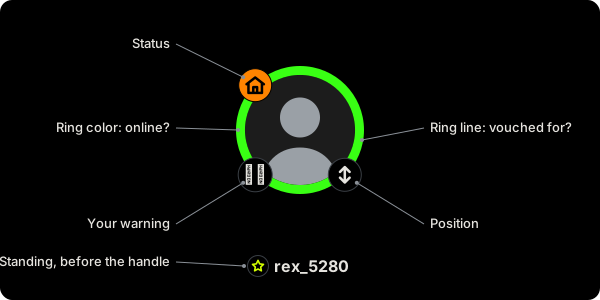
The ring's color: are they online?
The app works this out. Nobody picks it.

- Green. Online right now.
- Bone. On in the last half hour.
- Gray. Longer ago.
The ring's line: have they been vouched for?
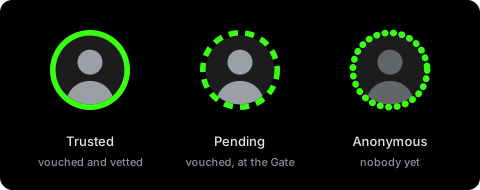
- Solid. Trusted. A member vouched for them and another member vetted them.
- Dashed. Pending. Vouched for, waiting at the Gate to be vetted.
- Dotted, photo dimmed. Anonymous: their clips aren't in yet. Members see Eligible by their name when someone has already vouched for them, and Anonymous when nobody has.
Color and line never get in each other's way. A dashed green ring is a Pending member who's online now. Getting in explains the tiers.
Top left: what are they up to?
This is the status they set, and it runs out on its own.

- Orange house. Hosting. Their door is open.
- Green eye. Looking: now, today or tonight.
- Marker. At a spot.
- Plane. Traveling.
- Nothing. Just browsing.
Status and the ring are separate. A host with a gray ring still has the door open, but they're not looking at their phone, so a reply may take a while. A green ring with no badge is someone online who isn't offering anything.
Before their name: their standing
Wherever a name shows, their standing badge sits right in front of it, on the same line. On the map, where a pin has no name, it sits at the pin's top right.
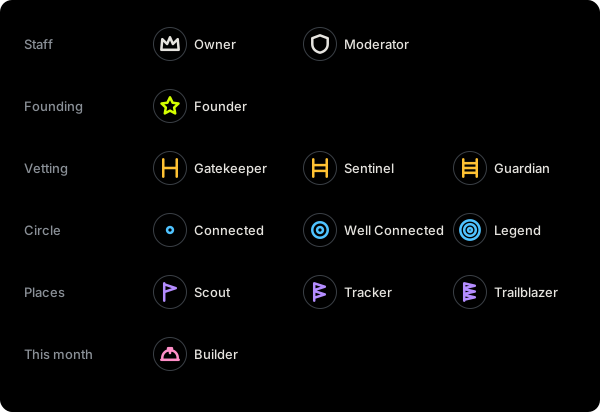
Staff, in white:
- Crown. The owner of Feral Mode.
- Shield. A moderator.
Honors, in yellow-green:
- Star. A founding member.
- Gate. A Gatekeeper, who vets people in. One rail for Gatekeeper, two for Sentinel, three for Guardian.
- Rings. A big circle: everyone they brought in, and everyone those people brought in. One ring for Connected, two for Well Connected, three for Legend.
- Flags. Places they put on the map. One flag for Scout, two for Tracker, three for Trailblazer.
- Hard hat. A Builder: they met this month's goal.
Only the highest one shows. A level III beats a level II, whichever kind it is; at the same level, a gate beats rings, and rings beat flags. Their profile shows every one in front of their name, and lists them by name below. Most people have none.
Bottom right: position
Arrows up for top, down for bottom, both for vers, the bigger head on the side a vers leans to. Nothing if they haven't said.
Bottom left: your warning
If you gave someone a warning in your notes on them, the worst one sits here. Only you ever see it.
The inside
Their photo, or their SFW photo when you have SFW mode on. A gray figure means they have no photo, or you're Anonymous and can't see members yet.
Your own icon
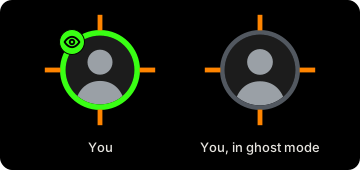
Yours follows every rule above, so you see yourself the way others do, plus the orange ticks from the Feral Mode logo around it. In ghost mode nobody sees you at all, and your ring goes gray to remind you. People you're still chatting with see it gray too, with no status: to them you're away.
In the grid
A tile is a photo, not a circle, so it reads the same parts another way. The dot top left is the ring's color, and their status sits under it; the top right holds the buttons to find them on the map, tap them and open their profile. Along the foot: your warning, their standing and name, and their position. The tile's edge is the ring's line: dashed for Pending, dotted for Anonymous.
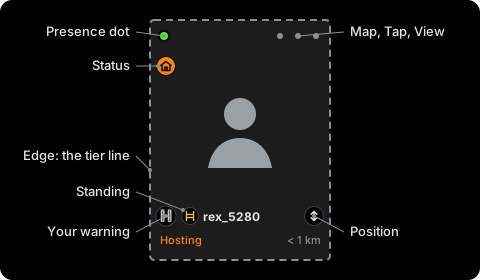
On a profile
A profile starts with their icon. Next to it, every standing they hold in front of their name, not just the highest, then whether they're online and their status, in the same colors as on the icon. Under that, each standing by name. The frame around their photos takes the ring's line, and your warnings sit at its bottom left.

Small icons
In chat rows, icons can be too small for all their corners. They keep the ring and the status badge. Open the person to see the rest.
Color is never the only signal. Every badge has its own shape, and screen readers hear each icon in words: "Online, hosting, Trusted, vers."
Updated October 30, 2026